Tape LivesWhen I first started in backup and recovery, my primary backup medium was DDS-1 tapes, distributed across probably 15 servers in a computer room. Over time the number of hosts with dedicated tape drives dropped as systems were consolidated into NetWorker, and the NetWorker server got a couple of gravity-fed DDS autoloaders.

Needless to say, since that point I’ve watched lots of changes in tape technology, particularly since LTO burst onto the scene. DLT had been seemingly stagnant for years, a practical monopoly in the server space, and suffering a severe lack of innovation.

Despite years of various vendors trying to push that tape is dead, we’ll see it remain for some time yet, mainly because it still represents an incredibly economic way of storing large amounts of backup data. Sure, you can avoid using tape if you’ve got replicated backup-to-disk storage between two sites, but that either requires a substantial MAID-style footprint, or some deduplication unit – and either way it’s going to cost you a lot of money. (My personal belief is that 10TB per week backup is the minimum cut-off for consideration of deduplication technologies; and there’s a lot of businesses still backing up less than 10TB per week.)

So, here’s what I see as the key continuing trends for tape:

  1. Minimised usage for primary copy – This is a no-brainer, really. Backup to disk has taken over as the primary mechanism in a significant percentage of businesses – the “B2D2T” model, so to speak. There’s no doubt that model will continue, regardless of what that initial “to disk” looks like.
  2. Fallback/secondary copy – Tape will continue to reign supreme as the preferred fallback/secondary copy of backups for some time to come. This decade is indeed the one where some form of backup to disk will become the norm for the vast majority of businesses, but when it comes to those monthly backups that need to be kept for 7+ years, etc., tape will continue to shine.
  3. Enterprise tape is squeezed down – It used to be that there were two distinct tiers of tape: enterprise technology such as LTO (unless you believed the IBM hype that said LTO was toy-tape) and commercial/consumer tape, such as AIT, DDS, etc. That enterprise technology remained largely out of reach of the smaller businesses, but as backup to disk continues to press into the nearline/immediate recovery arena, use of enterprise tape as a primary backup and recovery source will be pushed down into smaller businesses.
  4. Commercial/consumer tape is squeezed out – Those non-enterprise tape formats, such as AIT, DDS, etc., are dead. Sony discontinued AIT to work with HP et al on DDS development, and DDS effectively died at v5. Oh, HP blather on about DDS still having a future – DDS-6/160 was released a while ago, and DDS-7/320 is supposedly in development, but these are dead duck technologies. These non-enterprise tapes were at best unreliable formats – they actually gave a lot of fodder to the “tape is dodgy” meme, and the way they’re kept on life-support by vendors unwilling to concede their time is past is frankly embarrassing.
  5. Deduplication will not migrate in any usable form to tape – Various companies blather about having “deduplication out” to tape from their products, be they target or source deduplication, but this writing of deduplicated data to tape format is fundamentally flawed and logically incompatible. Why? Deduplication requires massive amounts of random access to be able to rehydrate efficiently, but tape is sequential-access by design. So instead what is written out to tape in “deduplicated” format is entire deduplication environments, which must be read back and recovered to systems before a regular recovery can be run. Instead, they just create situations where recoveries aren’t done unless they’re hyper-critical because there’s too much effort involved.
  6. Hardware encryption will become the norm – Initially introduced in LTO-4, we’ll see continued adoption of hardware-encryption at the per-cartridge level as businesses become acutely aware of the potential damage caused by media theft. We’re already seeing various countries legislate requiring encryption of at-rest data in particular industries, and this is driving more businesses to use hardware encryption “just in case”.
  7. We’ll continue to be told tape is dead – As sure as the sun rises each day, we’ll awake almost every day to another story about the imminent death of tape.
  8. Direct iSCSI tape drives are here – Some vendors are already selling them; as the war settles between FC and IP, it’s logical that we’ll see tape drives and tape libraries appearing with 10Gbe connections. This should make connectivity simpler and quite possibly more flexible.

Other predictions

OK, the above list are the things I’m certain about. Here are a few things I’m not certain about, but I’ve been idly speculating on for some time…

  1. QR Barcodes – Personally, I think these are a joke. However, I’m betting that someone will start selling combo tape barcodes where for reach regular tape barcode you get a QR barcode so that operators and administrators can scan them from their phones, etc. They’ll be sold as allowing a whole new level of integration, automation and control, and a few businesses will get sucked into buying them. They won’t last long though. That’s assuming that QR barcodes themselves stay popular enough for this to happen.
  2. Tape RFID will get bigger – Some tape vendors are already selling tapes with RFID embedded. This’ll be a low-traction market for some time to come, but I suspect it’ll eventually become standard. I.e., this is an evolutionary rather than revolutionary progression in tape.
  3. Hardware twinning with software recognition – RAIT lost its appeal years ago, though some proprietary control systems such as ACSLS still support it. I suspect we’re going to reach a point though where hardware enabled tape twinning will be offered as a feature from those enterprise tape vendors who are being squeezed down. However, the difference will be that there’ll be APIs between the libraries/drives and the backup software to allow the backup software to see the secondary tapes as registered copies. Why? Tracking and accountability. Auditing and data tracking requirements will see to that. I don’t necessarily think that this will gain a lot of traction, but I do think it’ll become an offering again.
 

Recently I wrote, “7 common problems with deduplication“. That covered some of the practicalities that you need to be aware of. However, that wasn’t a definitive list, and I wanted to expand on that a little with this post.

These are:

  1. Architecture – How will it fit together?
  2. Rehydration – Can your pipe accommodate the data?
  3. Redundancy – Are you putting all your eggs in the one basket?
  4. Replicas – How will your copies be handled and recognised by the server?
  5. Long term storage – What is your strategy for longer-term backups?

Each of these include factors that you have to consider before you go ahead with data deduplication within an environment, and I’ll go through each one individually.

Architecture

If we look at NetWorker and target based deduplication, we run into an interesting architectural issue. The way NetWorker generates multiplexed savesets can have a direct impact on the compressibility of the datastream. In particular, all VTL based deduplication devices should be configured such that each virtual drive has both target and max sessions set to 1.

In a conventional tape or backup-to-disk environment, it’s common to see configurations where 4 or more sessions are streamed to each device. For physical tape, this may be partly due to the need to keep drives streaming, but it can also be to do with making sure that there’s not a backlog of pending savesets, too – i.e., keeping the backup window as narrow as possible.

If we cut away from that process and move to an architecture that has a 1:1 ratio for streams and virtual drives, the logical solution is to increase the number of virtual drives. Typically I’d suggest that there’s at least a 4:1 ratio of virtual drives to physical drives when a VTL is replacing a PTL. I.e., if you had 4 physical drives, you’ll be configuring a VTL with at least 16 virtual drives.

However, if we look at NetWorker licensing, this has an odd effect. VTLs will either get ‘real’ VTL licenses if they’re of a particular EMC brand, or an alternate VTL license bundle, which grants 3 x Unlimited Autochanger licenses per XTB presented by the VTL.

Neither of those licenses are the issue – the issue is actually with NetWorker’s limitations relating to the number of devices per storage node or server. For NetWorker, Network Edition, you’re entitled to:

  • 16 devices on the server;
  • 16 devices on each storage node.

For NetWorker, Power Edition, you’re entitled to:

  • 32 devices on the server;
  • 32 devices on each storage node.

That’s all well and good for physical tape environments – but once you go virtual, those limitations can get very tight, very quickly. (Hint, EMC: Those limitations should be doubled or quadrupled, please.)

The net effect is that if you have say, a 4-drive PTL and a 16-drive VTL, but just a single server, no storage nodes, you’ll need to do one of the following:

  • Upgrade from Network edition to Power Edition, or
  • Purchase an additional storage node license to ‘stack on’ an extra 16 devices.

Yes – you can purchase and add-on storage node licenses to add to the permitted device count within the environment, without adding an actual storage node. This is handy to know in normal situations, but when it comes to deduplicating VTLs in particular, it’s a must.

Rehydration

It’s all very well to have a fabulous deduplication ratio. Let’s say you’re achieving 10:1 or something along those lines. However, we don’t just deal in deduplicated data. At some point, that data is going to have to be rehydrated. Typically this’ll be for one of the following:

  • As part of a recovery, or
  • For tape-out functionality.

In either case, you’re no longer concerned about the deduplication ratio you’ve achieved, but the amount of rehydrated data you’ll be streaming out. One immediate consideration is that if you’ve deployed deduplication backups for branch-office scenarios, and you’ve been loving the ‘trickle’ effect of only sending unique data across the WAN, you’re going to be somewhat less enamoured by having to send the entire data stream, rehydrated, back across the WAN.

Unless, of course, you’ve architected for that situation.

If you’re doing tape-out – either cloning or staging, then you need to still factor that actual rehydrated size into any sizing calculations for a physical tape library. In particular, a common mistake I’m seeing is that people think that by implementing deduplication they can substantially reduce the number of physical tape drives in the environment. I would suggest that as a general rule of thumb for most sites, a reduction of between one quarter and one third of the physical devices is the most you can hope to achieve. If you pull out more than that, you’re likely going to suffer serious contention during tape out operations. You’ll also be totally blown out of the water whenever there’s a physical fault.

Redundancy

Deduplication should never be deployed on its own. E.g., you can’t just have a single Avamar RAIN or a single target deduplication unit. It’s putting all your eggs in one basket. You need some form of atomic-unit redundancy, be that a second grid you replicate to, or a second DD you replicate to, or tape-out.

I’ve heard of solutions deployed that have a single Avamar RAIN for instance – and just a few nodes in the grid – with no tape out, and no replication to another site. I personally think that’s data-suicide. Sure, any individual node in a RAIN can fail and the grid will continue, but you’ve still got the fundamental problem – what happens if you lose your grid?

The same applies to target based deduplication. For ease of consideration, any deduplication configuration, be it Avamar, Data Domain, Quantum, FalconStor or anything else should be considered to have one unit per physical location. And if, under those definitions, you’ve only got one unit – well, you’ve got insufficient redundancy.

Replicas

In particular with target based deduplication, if you’re using the replication functionality of the deduplication device (to avoid a NetWorker clone rehydrate+deduplicate again scenario), you introduce a new challenge – how do you get NetWorker to actually know about the replicas? Items for consideration here are:

  1. Can both replicas be online at the same time? I.e., does the deduplication environment support this?
  2. Will NetWorker perceive the replicas as the same physical media? I.e., do the replicas have the same volume ID? If so, NetWorker won’t permit them to be mounted in two different locations at once.
  3. How ‘atomically’ can replicas be brought online? If replicas do have the same volume ID, what is the smallest replica that can be brought online? Typically this will be either a single virtual tape, or a single disk backup unit. For virtual tapes, that’ll be more manageable. For disk backup units, it presents more of a problem.

Newer technology, such as DD Boost, which integrates NetWorker’s cloning facilities with the inherent replication capabilities of the hardware, address this issue. If you’re not using DD Boost though, you need to come up with your own solution.

Long Term Storage

Want deduplication? Want enough deduplication to handle 7 years of backups? 10 years? 15 years? ‘Forever’ years? Long term storage can’t be left by the way-side, you have to plan and architect this into your solution.

Some deduplication vendors (EMC included) are starting to tout new archive credentials in their deduplication arrays, but to be perfectly frank, the long-term cost of maintaining large amounts of either spinning or partially spun down disks with deduplicated storage, vs a batch of tapes with rehydrated storage, is still not at a point that can be entertained by many businesses. Tape is, and shall continue to be cheap for longer term storage and archival storage. Anyone who tries to tell you otherwise likely has a vested interest in dropping more storage on your datacentre floor.

When planning for longer-term storage in a deduplication environment, you have to make a few decisions in advance:

  • Do longer term backups go direct to tape (or conventional disk staging areas) instead of ever hitting deduplicated storage?
  • If the longer-term backups do sit on deduplicated storage, what will be the additional size requirements?
  • Are those size requirements worth it? E.g., if you have to buy a unit that has an additional 20TB of deduplication capabilities in order to hold all the long-term backups that you want to keep ‘nearline’, is it actually worth it, given it’ll always be staged out/relocated to longer-term storage, or do you go for a cheaper initial storage option as well?

Summing up

Between this and other articles, one might think that I’m actually against deduplication. I’m not. However, I am dead-set against the mis-use of technology. Wasteful spending, particularly in the backup environment, just leads to bigger issues – such as artificial and inaccurate budgetary restraints at a later point in time.

When it comes to deduplication, I guess there can only be one rule: eyes wide open.


In an earlier article, I suggested some space management techniques that need to be foremost in the minds of any deduplication user. Now, more broadly, I want to mention the top 7 things you need to avoid with deduplication:

1 – Watch your multiplexing

Make sure you take note of what sort of multiplexing you can get away with for deduplication. For instance, when using NetWorker with a deduplication VTL, you must use maximum on-tape multiplexing settings of 1; if you don’t, the deduplication system won’t be able to properly process the incoming data. It’ll get stored, but the deduplication ratios will fall through the floor.

A common problem I’ve encountered is a well running deduplication VTL system which over time ‘suddenly’ stops getting any good deduplication ratio at all. Nine times out of ten the cause was a situation (usually weeks before) where for one reason or another the VTL had to be dropped and recreated in NetWorker – but, the target and max sessions values were not readjusted for each of the virtual drives.

2 – Get profiled

Sure you could just sign a purchase order for a very spiffy looking piece of deduplication equipment. Everyone’s raving about deduplication. It must be good, right? It must work everywhere, right?

Well, not exactly. Deduplication can make a big impact in the at-rest data footprint of a lot of backup environments, but it can also be a terrible failure if your data doesn’t lend itself well to deduplication. For instance, if your multimedia content is growing, then your deduplication ratios are likely shrinking as well.

So before you rush out and buy a deduplication system, make sure you have some preliminary assessment done of your data. The better the analysis of your data, the better the understanding you’ll have of what sort of benefit deduplication will bring your environment.

Or to say it another way – people who go into a situation with starry eyes can sometimes be blinded.

3 – Assume lower dedupe ratios

A fact sheet has been thrust in front of you! A vendor fact sheet! It says that you’ll achieve a deduplication ratio of 30:1! It says that some customers have been known to see deduplication ratios of 200:1! It says …

Well, vendor fact sheets say a lot of things, and there’s always some level of truth in them.

But, step back a moment and consider compression ratios stated for tapes. Almost all tape vendors give a 2:1 compression ratio – some actually higher. This is all well and good – but now go and run ‘mminfo -mv’ in your environment, and calculate the sorts of compression ratios you’re really getting.

Compression ratios don’t really equal deduplication ratios of course – there’s a chunk more complexity in deduplication ratios. However, anyone who has been in backup for a while will know that you’ll occasionally get backup tapes with insanely high compression ratios – say, 10:1 or more, but an average for many sites is probably closer to the 1.4:1 mark.

My general rule of thumb these days is to assume a 7:1 compression ratio for an ‘average’ site where a comprehensive data analysis has not been done. Anything more than that is cream on top.

4 – Don’t be miserly

Deduplication is not to be treated as a ‘temporary staging area’. Otherwise you’ll have just bought yourself the most expensive backup to disk solution on the market. You don’t start getting any tangible benefit from deduplication until you’ve been backing up for several weeks. If you scope and buy a system that can only hold say, 1-2 weeks worth of data, you may as well just spend the money on regular disk.

I’m starting to come to the conclusion that your deduplication capacity should be able to hold at least 4x your standard full cycle. So if you do full backups once a week and incrementals all other days, you need 4 weeks worth of storage. If you do full backups once a month with incrementals/differentials the rest of the time, you need 4 months worth of storage.

5 – Have a good cloning strategy

You’ve got deduplication.

You may even have replication between two deduplication units.

But at some point, unless you’re throwing massive amounts of budgets at this and have minimal retention times, the chances are that you’re going to have to start writing data out to tape to clear off older content.

Your cloning strategy has to be blazingly fast and damn efficient. A site with 20TB of deduplicated storage should be able to keep at least 4 x LTO-5 drives running at a decent streaming speed in order to push out the data as its required. Why? Because it’s rehydrating the data as it streams back out to tape. Oh, I know some backup products offer to write the data out to tape in deduplicated format, but that usually turns out to be bat-shit crazy. Sure, it gets the data out to tape quicker, but once data is on tape you have to start thinking about the amount of time it takes to recover it.

6 – Know your trends

Any deduplication system should support you getting to see what sort of deduplication ratios you’re getting. If it’s got a reporting mechanism, all the better, but in a worst case scenario, be prepared to log in every single day for your backup cycles and see:

-a- What your current global deduplication ratio is

-b- What deduplication ratio you achieved over the past 24 hours

Use that information – store it, map it, and learn from it. When do you get your best deduplication ratios? What backups do they correlate to? More importantly, when do you get your worst deduplication ratios, and what backups do they correlate to?

(The recent addition of DD Boost functionality in NetWorker can make this trivially easy, by the way.)

If you’ve got this information at hand, you can use it to trend and map capacity utilisation within your deduplication system. If you don’t, you’re flying blind with one hand tied behind your back.

7 – Know your space reclamation process and speeds

It’s rare for space reclamation to happen immediately in a deduplication system. It may happen daily, or weekly, but it’s unlikely to be instantaneous. (See here for more details.)

Have a strong, clear understanding of:

-a- When your space reclamation runs (obviously, this should be tweaked to your environment)

-b- How long space reclamation typically takes to complete

-c- The impact that space reclamation operation has on performance of your deduplication environment

-d- An average understanding of how much capacity you’re likely to reclaim

-e- What factors may block reclamation. (E.g., hung replication, etc.)

If you don’t understand this, you’re flying blind and have the other hand tied behind your back, too.


Deduplication can create fantastic space saving opportunities within an environment, but it does also create the need for a much closer eye on space management.

We’re used, in conventional backup or storage situations, to the following two facts:

  • There is a 1:1 mapping between amount of data deleted and amount of space reclaimed.
  • Space reclamation after delete is near instantaneous.

Data deduplication systems throw both those facts out. In other words, there’s no free lunch: you may be able to store staggeringly large amounts of data on relatively small amounts of storage, but there’s always swings and roundabouts.

With deduplication systems, you must carefully, aggressively monitor storage utilisation since:

  • There is no longer a 1:1 mapping between amount of data and amount of space reclaimed: You might, if you’re running out of space, selectively delete several TB of data, but due to the nature of deduplication, reclaim only a very small amount of actual physical space as a consequence.
  • Space reclamation is not immediate: whenever data is deleted from a deduplication system, the system must scan remaining data to see if there’s any dependencies. Only if the data deleted was completely unique will it actually be reclaimed in earnest; otherwise all that happens is that pointers to unique data are cleared. (It may be that the only space you get back is the equivalent of what you’d pull back from a Unix filesystem when you delete a symbolic link.) Not only that, reclamation is rarely run on a continuous basis on deduplication systems – instead, you either have to wait for the next scheduled process, or manually force it to start.

The net lesson? Eternal vigilance! It’s not enough to monitor and start to intervene when there’s say, 5% of capacity remaining. Depending on the deduplication system you may find that 5% remaining space is so critically low that space reclamation becomes a complete nightmare. In reality, you want to have alerts, processes and procedures targeting the following watermarks:

  • 60% utilisation – be on the look out for unexpected data growth.
  • 70% utilisation – be actively monitoring daily consumption rates.
  • 75% utilisation – you should know by know whether you have to expand the storage, or whether usage will stabilise again.
  • 80% utilisation – start forcing space reclamation to occur more frequently.
  • 85% utilisation – If you have to expand the storage, the purchase process should be complete and you should be ready to install/configure.
  • 90% utilisation – have emergency processes in place and ready to activate for storage redirection.

With these watermarks noted and understood, deduplication will serve your environment well.


When IDATA was beta testing NetWorker 7.6 SP1, my colleagues in New Zealand were responsible for testing the DD/Boost functionality. This, as you may have heard, allows for tighter integration between NetWorker and Data Domain systems, in much the same way that Data Domain has previously integrated with NetBackup.

I’m now doing a DD/Boost implementation, and I’ve got to say, I’m pretty impressed at the integration. At the moment, this is a standalone Data Domain 670, which we’ll be cloning out to physical tape from, so my satisfaction with the integration level has nothing to do with replication. I’ll cover that off when I implement Boost replication.

The first thing that impressed me was that under Boost, the Data Domain device types can be configured with parallelism greater than 1 without affecting the deduplication ratio. That means that a datazone won’t end up with so many devices as it would have to under a normal VTL or ADV_FILE dedupe configuration, which is a nice bonus. (And also better for licensing, too.)

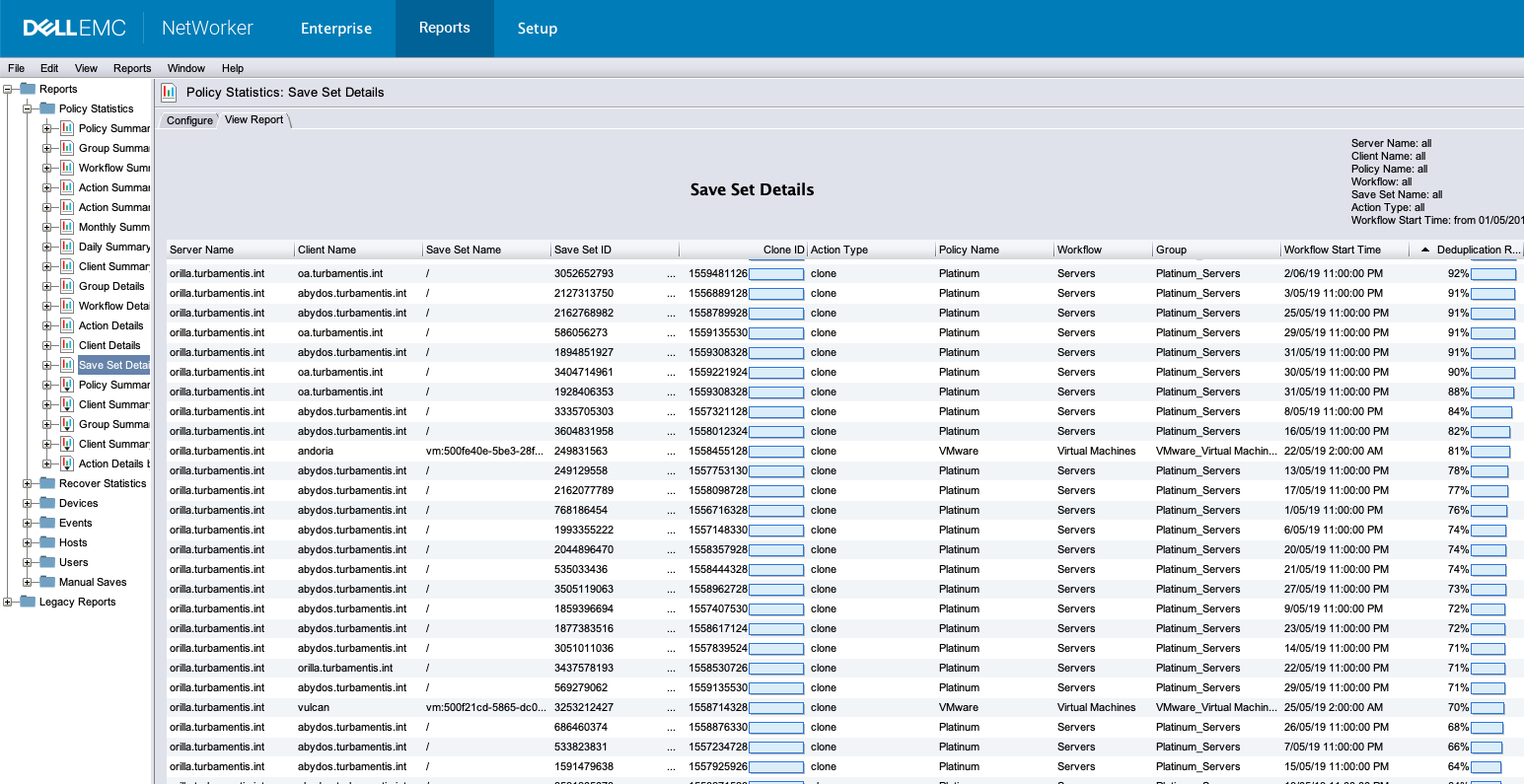
The thing that really gave me a head spin though was the reporting integration. Having done some target based dedupe work before this in NetWorker, I’d been finding it frustrating that I couldn’t drill down and find out what sort of dedupe ratios clients and filesystems were getting. Boost is the answer:

Dedupe ratio

This, as you can imagine, is pretty cool reporting. Not only can you see what systems are getting great deduplication ratios, it’ll make it easy as pie to find the ones that aren’t.

Going up a level, the same applies to clients, too:

Client dedupe summary

When you can isolate clients, filesystems and data that doesn’t deduplicate well, you can do any or all of the following:

  • Send data direct to physical tape if necessary;
  • Send data to slower, non-deduplicating disk backup;
  • Send data to the deduplication device, but immediately clone and stage out as a priority.

I think I’m going to have a long and productive affair with Boost.


The holiday season is upon many of us – whether you celebrate xmas or christmas, or just the new year according to the Julian calendar, we’re approaching that point where things start to ease off for a lot of people and we spend more time with our families and friends.

Before I wrap up for the year, I wanted to spend a few minutes reintroducing some of the most popular topics of the year on the blog – the top ten articles based on directly linked accesses. Going in reverse order, they are:

  • Number 10 – “Why I’d choose NetWorker over NetBackup every time“. I was basically called an idiot by someone in the storage community for writing this, but the fact remains for me that any backup product that fails to support backup dependencies is not one that I would personally choose. Given that a top search that leads people to the blog is of the kind, “netbackup vs networker” or “networker vs netbackup”, clearly people are out there comparing the two products, and I stand by my support of the primacy of backup dependency tracking.
  • Number 9 – “A tale of 4 vendors“. A couple of months ago I attended SNIA’s first Australian storage blogger event, touring EMC, IBM, HDS and NetApp. Initially I’d planned to blog a fairly literal dump of the information I jotted down during the event, but I realised instead I was more drawn to the total solution stories being told by the 4 vendors.
  • Number 8 – “NetWorker 7.5.2 – What’s it got?“. NetWorker 7.5 represented a big upgrade mark for a lot of sites, particularly those that wanted to jump the v7.3 and v7.4 release trees. I still get a lot of searches coming to the blog based on NetWorker 7.5 features and upgrades.
  • Number 7 – “Using NetWorker Client with Opensolaris“. This was written by guest blogger Ronny Egner, and has seen more interest over the last few months as Oracle’s acquisition continues to grind down paid Sun customers. If you’re interested in writing guest blog pieces for the NetWorker Blog in 2011, let me know!
  • Number 6 – “Basics – Fixing ‘NSR peer information’ errors“. I’ve said it before, and I’ll say it again: there is no valid reason why the resolution for this hasn’t been built into NMC!
  • Number 5 – “NetWorker and linuxvtl, Redux“. The open source LinuxVTL project continues to grow and develop. While it’s not suited for production environments, LinuxVTL is certainly a handy VTL to plug into a NetWorker/Linux system for testing purposes. I know – I use it almost every single day.
  • Number 4 and Number 3 – “NetWorker 7.6 SP1“. Interest in NetWorker 7.6 SP1 has been huge, and I had two blog postings about it – a preview posting based on publicly shared information from EMC, and the actual post-release article that covered some key features more in-depth.
  • Number 2 – “Carry a Jukebox with you (if you’re using Linux)“. The first article I wrote about the LinuxVTL project.
  • Number 1 – “micromanual: NetWorker Power User Guide to nsradmin“. The Power User guide to nsradmin has been downloaded well over a thousand times. I’ve been a fan of nsradmin ever since I started using NetWorker and had to administer a few NetWorker servers over extremely slow links (think dial-up speeds). It’s been very gratifying to be able to introduce so many people to such a useful and powerful tool.

Personally this year has been a pretty big one for me. Probably the biggest single event was that my partner and I made the decision to move from central coast NSW to Melbourne, Victoria during the year. We haven’t moved yet; it’s due for June 2011, but it’s going to necessitate a lot of action and work on our part to get there. It’ll be well worth the effort though, and I’ve already reached that odd point where I no longer think of the place I’m living as “home”. The reasons that led us to that decision are covered on my personal blog here. Continuing the personal front, I was extremely pleased to be able to say goodbye to the mobile “netwont” that is Vodafone in Australia. I’ve been using my personal blog to talk about a lot of varied topics running from internet censorship to invasive information requests to more mundane things, such as what makes a good consultant.

Technically I think the coming few years are going to be fascinating. Deduplication has only just started to make a splash; I think it’ll be a while before it becomes as pervasive as say, plain old disk backup, but it will have a continued and growing effect in the enterprise backup market. I predict that another bevy of dopey analysts will insist that tape is dead, just like they have every year for the last 2 decades, and at the end of the year I predict the majority of companies they interface with will still be using tape in some form or another. However, the use of tape will continue to evolve in the marketplace; as nearline disk storage becomes more regular and cheaper for backup solutions, we’ll see tape continue to be pushed out to longer term retention systems and safety nets – i.e., tape is certainly sliding away from being the primary source for recoveries in an enterprise backup environment.

One last thing – I want to thank the readers of this blog. To those people who subscribe to the mailing list, and those who subscribe to the RSS feed, to those who have the site bookmarked and to those who just randomly stumble across the site – I hope in each case you’re finding something useful, and I’m grateful for your readership.

Happy holidays to those of you celebrating or relaxing over the coming weeks, and peaceful times to those working through.


Over at The Backup Blog, Scott Waterhouse offers an alternate perspective on why the announcement by IBM of an in-lab tape technology that fits 35TB per cartridge is largely irrelevant to a doomed market.

I respectfully disagree with Scott’s assessment. I also swear that even though I absolutely loathe the song “Killing me Softly”, naming the blog post after that song had nothing to do with my disagreement on his assessment.

Scott takes two arguments:

  1. It seems a lot like previous announcements by Sun that they were going to release $10M+ servers that were just servers, then later come up with a model that allows the development of servers one twentieth to one fortieth cheaper that do the same job.
  2. That there already is a serious decline in tape, and this will trigger a terminal decline.

You may recall that a while ago I linked to a fairly astute piece by Drew Robb over at Server Watch titled “Tape vs Disk: Tape Refuses to be Evicted“. What was most interesting in Drew’s article was this quote:

How are tape sales? IDC references several studies. Tape overall is down, although the slide is mainly at the lower end. Robert Amatruda, a tape analyst for IDC, said that the market for tape automation products below 100 tape cartridges would suffer most. Another IDC study on Asia-Pacific sales from last year showed automated tape libraries to be up 15 percent for the year, while tape drives fell 19 percent. Cheryl Ganesan-Lim, an IDC analyst, noted that disk storage allows better recovery speeds, thus making it suitable for Tier 1 and Tier 2 storage. Tape, on the other hand, is better for deep archiving of rarely accessed data. She expected tape library sales to rise slightly over the next five years.

So tape is down in lower-end, smaller-scale and more immediate data recovery categories, but it is largely holding its own at the high end. It looks like tape’s death isn’t imminent.

A lot of people are quick to jump on the notion that tape sales are declining. What I take from Drew’s article is the logical fact that at the low end of the market, tape is well and truly dropping off. Pretty much every small business that I’m aware of at an IT level have shifted their backup operations from tape to disk (removable or otherwise) in the last 5 years. I don’t see this trend reversing.

But I’m equally not seeing tape “dying” at the enterprise level as well. I recently wrote an article titled “Direct to Tape is Dead: Long Live Tape“. The title was quite intentional – I do see that at an enterprise level the reasons for backing up to tape directly have been falling for years, and this will be the decade where that is well and truly finished off as a “standard” backup practice. However, that doesn’t meant the death of tape in backup circles.

Scott and I disagree usually when it comes to deduplication. My preference for a start is target based deduplication so that it slots into an existing solution, and he raises alternate arguments that moving to source based deduplication is a good thing. Neither argument is 100% correct, and neither argument is 100% incorrect; they’re just different ways of looking at the same problem.

Scott argues that because IBM has come up with a staggering increase in the capacity of tape, they’re going to struggle to sell sufficient numbers of units in comparison to say, LTO-4 media – and they’re going to be unable to raise the price of their products to match the 40 fold increase in capacity:

But I would be willing to bet my last dollar that there will not be any similar increase in cost or in units shipped to offset this. No tape cartridge is going to cost $2000 (roughly 40x what a current LTO cartridge costs). And they sure aren’t going to sell 40x as may of them.

Looking at a cost perspective, I’m not convinced. When we compare say, even a theoretical cost of $2000 per cartridge for IBM über-dense tape capable of holding 35TB uncompressed, and the actual cost of a Data Domain 32TB dedupe solution, the numbers speak fairly heavily towards buying a bunch of 35TB tapes. Even at that price for the media, there will be orders of magnitude difference between the cost of magnetic tape and the cost of fully specced dedupe solutions. (Particularly when accounting for the need for replication – hence, two such units.)

What I’m going to suggest is that we’re seeing an evolution in the datacentre which is splitting off a high end portion – maybe 5% to 10% of the datacentres of the world. There’s an incorrect assumption, I believe, that everyone can solve all their backup and data storage issues with deduplication. I’d argue that given the relative costs of these technologies at the moment, and the inherent need they currently create for replication of solutions, thus effectively doubling (at times) of prices, and the relatively huge (by comparison) CapEx costs associated with doubling those purchases vs the relatively small ongoing OpEx costs of media, there will be a significant portion of the datacentre that continues to work with tape on a day to day basis and will continue to upgrade those tape technologies to the ones which give higher capacity.

I’d go so far as to diagram it as follows:

Disk and tape usage in backup

Obviously I’m not trying to make the above diagram scientifically accurate. What I’m trying to highlight is that top 5-10% of businesses in the enterprise arena who will more than likely ditch tape altogether in the backup arena. (I will make no predictions on archive.) I fully agree that there’s an evolutionary trend for this ditching of tape entirely in certain datacentres, but only in the biggest.

What I’m increasingly seeing is that there’s a marked difference between what small percentage of high end enterprises do and what the rest of companies that are classified as “enterprises” do when it comes to backup and recovery. This is driven by cost, availability and complexity. Like relativity and quantum physics/mechanics, neither the “dedupe and replicate” nor the “disk and tape” arguments hold true for the entire picture. When looking at the available scenarios from one perspective, it’s clear dedupe and replicate is the way to go. When looking at the available solutions from another perspective, it’s clear disk+tape is the way to go.

My argument simply is that we’re still only at the point where 5-10% of the enterprises out there are suitable for the dedupe only+replicate solutions, and the majority of the rest will still fall into a category of requiring disk and tape. Again, neither argument is wrong, it’s just we’ve seen an evolutionary split in the datacentre between types of enterprises, and those types of enterprises need to be handled differently.


In a previous article, I discussed how deduplication is one of those technologies that still straddles the gap between bleeding edge and leading edge, and thus needs to be classified as bleeding edge.

Putting aside the bleeding edge/leading edge argument for the moment (though my view there remains the same), a growing concern I have for deduplication is that it’s popping up everywhere in little islands rather than as a fully integrated option.

The net result? Dedupe on primary storage. Rehydrate to access. Modify, then dedupe to save again. Rehydrate for next access. Dedupe for saved changes. Rehydrate to backup. Dedupe the backup. Rehydrate for recovery.

All this dedupe is making me thirsty. Worse, it’s starting to look like a roller-coaster ride, and I always have the same reaction to them – horror, then an urge to throw up a little. The cycle doesn’t even look nice:

Dedupe/Rehydrate Cycle

So, what’s the solution?

There’s certainly no easy solution – and currently no integrated solution. Not without some serious consideration to standards. Let’s accept, for the moment, that there’s no real option to keep in-OS/RAM data deduplicated. (I.e., at the per-operating system level – maybe there would be at a cross-OS virtualisation level within the hypervisor, but we’re not really there yet.)

One obvious factor that springs to mind is that the first, best approach to some normalisation would be to come up with a technique to transfer deduped primary storage in its deduped format to a deduped backup storage. There are already techniques for synchronising deduplicated data (e.g., when replicating between say, two Data Domain hosts). Why rehydrate when the next step is going to be a new dedupe algorithm being applied, for instance?

If we look at NetWorker, there are a number of places where dedupe can happen, either as part of the backup cycle, or a larger strategy:

  • Primary storage deduplication via say, a Data Domain storage box or something along those lines.
  • Archive/single instance deduplication for less frequently accessed files (say, Centera).
  • Source based dedupe backup (via an Avamar node).
  • Dedupe VTL (data domain or the DL4000 with a deduplication add-on).

(No, I won’t put dedupe backup to disk there. Not until ADV_FILE starts working better.)

Within the EMC product kit, there’s a lot of chance for interoperability of deduplicated data without the need to rehydrate. If anything, EMC is one of the few vendors out there (HP and IBM are the only others that spring to mind) that offer reasonably complete verticals on storage, running from the base array to the backup solution.

Based on EMC’s strong focus on deduplication with the acquisition of both Avamar and Data Domain, it seems a distinct possibility that this is at least a part of their planning. Shifting deduplicated data between disparate products without needing to rehydrate does have potential to be a game changer in terms of how we work with data, but I’ll promise you this: you won’t see this level of integration this year, and possibly not for the next few years. That level of integration is not going to be easy, it’s not going to come quick, and it’s going to require extreme levels of testing to make sure that it actually works when it is implemented.

So for the time being, we’ll have to continue to put up with deduplication being done in little islands within our IT environments, and continue to ride the deduplication/rehydration roller-coaster. Let’s hope we all don’t get sick before solutions start to appear.


It goes without a doubt that we have to get smarter about storage. While I’m probably somewhat excessive in my personal storage requirements, I currently have 13TB of storage attached to my desktop machine alone. If I can do that at the desktop, think of what it means at the server level…

As disk capacities continue to increase, we have to work more towards intelligent use of storage rather than continuing the practice of just bolting on extra TBs whenever we want because it’s “easier”.

One of the things that we can do to more intelligently manage storage requirements for either operational or support production systems is to deploy deduplication where it makes sense.

That being said, the real merits of target based deduplication become most apparent when we compare it to source based deduplication, which is where the majority of this article will now take us.

A lot of people are really excited about source level deduplication, but like so many areas in backup, it’s not a magic bullet. In particular, I see proponents of source based deduplication start waving magic wands consisting of:

  1. “It will reduce the amount of data you transmit across the network!”
  2. “It’s good for WAN backups!”
  3. “Your total backup storage is much smaller!”

While each of these facts are true, they all come with big buts. From the outset, I don’t want it said that I’m vehemently opposed to source based deduplication; however, I will say that target based deduplication often has greater merits.

For the first item, this shouldn’t always be seen as a glowing recommendation. Indeed, it should only come into play if the network is a primary bottleneck – and that’s more likely going to be the case if doing WAN based backups as opposed to regular backups.

In regular backups while there may be some benefit to reducing the amount of data transmitted, what you’re often not told is that this reduction comes at a cost – that being increased processor and/or memory load on the clients. Source based deduplication naturally has to shift some of the processing load back across to the client – otherwise the data will be transmitted and thrown away. (And otherwise proponents wouldn’t argue that you’ll transmit less data by using source based backup.)

So number one, if someone is blithely telling you that you’ll push less data across your network, ask yourself the following questions:

(a) Do I really need to push less data across the network? (I.e., is the network the bottleneck at all?)

(b) Can my clients sustain a 10% to 15% load increase in processing requirements during backup activities?

This makes the first advantage of source based deduplication somewhat less tangible than it normally comes across as.

Onto the second proposed advantage of source based deduplication – faster WAN based backups. Undoubtedly, this is true, since we don’t have to ship anywhere near as much data across the network. However, consider that we backup in order to recover. You may be able to reduce the amount of data you send across the WAN to backup, but unless you plan very carefully you may put yourself into a situation where recoveries aren’t all that useful. That is – you need to be careful to avoid trickle based recoveries. This often means that it’s necessary to put a source based deduplication node in each WAN connected site, with those nodes replicating to a central location. What’s the problem with this? Well, none from a recovery perspective – but it can considerably blow out the cost. Again, informed decisions are very important to counter-balance source based deduplication hyperbole.

Finally – “your total backup storage is much smaller!”. This is true, but it’s equally an advantage of target based deduplication as well; while the rates may have some variance the savings are still great regardless.

Now let’s look at a couple of other factors of source based deduplication that aren’t always discussed:

  1. Depending on the product you choose, you may get less OS and database support than you’re getting from your current backup product.
  2. The backup processes and clients will change. Sometimes quite considerably, depending on whether your vendor supports integration of deduplication backup with your current backup environment, or whether you need to change the product entirely.

When we look at those above two concerns is when target based deduplication really starts to shine. You still get deduplication, but with significantly less interruption to your environment and your processes.

Regardless of whether target based deduplication is integrated into the backup environment as a VTL, or whether it’s integrated as a traditional backup to disk device, you’re not changing how the clients work. That means whatever operating systems and databases you’re currently backing up you’ll be able to continue to backup, and you won’t end up in the (rather unpleasant) situation of having different products for different parts of your backup environment. That’s hardly a holistic approach. It may also be the case that the hosts where you’d get the most out of deduplication aren’t eligible for it – again, something that won’t happen with target based deduplication.

The changes for integrating target based deduplication in your environment are quite small –  you just change where you’re sending your backups to, and let the device(s) handle the deduplication, regardless of what operating system or database or application or type of data is being sent. Now that’s seamless.

Equally so, you don’t need to change your backup processes for your current clients – if it’s not broken, don’t fix it, as the saying goes. While this can be seen by some as an argument for stagnation, it’s not; change for the sake of change is not always appropriate, whereas predictability and reliability are very important factors to consider in a data protection environment.

Overall, I prefer target based deduplication. It integrates better with existing backup products, reduces the number of changes required, and does not place restrictions on the data you’re currently backing up.


If you think you can’t go a day without hearing something about dedupe, you’re probably right. Whether it’s every vendor arguing the case that their dedupe offerings are the best, or tech journalism reporting on it, or pundits explaining why you need it and why your infrastructure will just die without it, it seems that it’s equally the topic of the year along with The Cloud.

There is (from some at least) an argument that backup systems should be “out there” in terms of innovation; I question that in as much as I believe that the term bleeding edge is there for a reason – it’s much sharper, it’s prone to accidents, and if you have an accident at the bleeding edge level, well, you’ll bleed.

So, I always argue that there’s nothing wrong with leading edge in backup systems (so long as it is warranted), but bleeding edge is far more riskier a proposition – not just in terms of potentially wasted investment, but due to the side effect of that wasted investment. If a product is outright bleeding edge then having it involved in data protection is a particularly dangerous proposition. (Only when technology is a mix of bleeding edge and leading edge can you at least start to make the argument that it should be at least considered in the data protection sphere.)

Personally I like the definitions of Bleeding Edge and Leading Edge in the article at Wikipedia on Technology Lifecycle. To quote:

Bleeding edge – any technology that shows high potential but hasn’t demonstrated its value or settled down into any kind of consensus. Early adopters may win big, or may be stuck with a white elephant.

Leading edge – a technology that has proven itself in the marketplace but is still new enough that it may be difficult to find knowledgeable personnel to implement or support it.

So the question is – is deduplication leading edge, or is it still bleeding edge?

To understand the answer, we first have to consider that there’s actually 5 classified stages to the technology lifecycle. These are:

  1. Bleeding edge.
  2. Leading edge.
  3. State of the art.
  4. Dated.
  5. Obsolete.

What we have to consider is – what happens when a technology exhibits attributes of more than one classification or stage of technology? To me, working in the conservative field of data protection, I think there’s only one answer: it should be classified by the “least mature” or “most dangerous” stage that it exhibits attributes for.

Thus, deduplication is still bleeding edge.

Why dedupe is still bleeding edge

Clearly there are attributes of deduplication which are leading edge. It has, in field deployments, proven itself to be valuable in particular instances.

However, there are attributes of deduplication which are definitely still bleeding edge. In particular, the distinction for bleeding edge (to again quote from the Wikipedia article on Technology Lifecycle) is that it:

…shows high potential but hasn’t demonstrated its value or settled down into any kind of consensus.

(My emphasis added.)

Clearly in at least some areas, deduplication has demonstrated its value – my rationale for it still being bleeding edge though is the second (and equally important) attribute: I’m not convinced that deduplication has sufficiently settled down into any kind of consensus.

Within deduplication, you can:

  • Dedupe primary data (less frequent, but talk is growing about this)
  • Dedupe virtualised systems
  • Dedupe archive/HSM systems (whether literally, or via single instance storage, or a combination thereof)
  • Dedupe NAS
  • For backup:
    • Do source based dedupe:
      • At the file level
      • At a fixed block level
      • At a variable block level
    • Do target based dedupe:
      • Post-backup, maintaining two pools of storage, one deduplicated, one normal. Most frequently accessed data is typically “hydrated”, whereas the deduped storage is longer term/less frequently accessed data.
      • Inline (at ingest), maintaining only one deduplicated pool of storage
    • For long term storage of deduplicated backups:
      • Replicate, maintaining two deduplicated systems
      • Transfer out to tape, usually via rehydration (the slightly better term for “undeduplicating”)
      • Transfer deduped data out to tape “as is”

Does this look like any real consensus to you?

One comfort in particular that we can take from all these disparate dedupe options is that clearly there’s a lot of innovation going on. The fundamental basics behind dedupe as well are tried and trusted – we use them every time we compress a file or bunch of files. It’s just scanning for common blocks and reducing the data to the smallest possible amount.

It’s also an intelligent and logical method of moving forward in storage – i.e., we’ve reached a point in storage where both companies that purchase storage, and the vendors that provide it, are moving towards using storage more efficiently rather than just continuing to buy it. This trend started with the development of SAN and NAS, so dedupe is just the logical continuation of those storage centralisation/virtualisation paths. More so, the trend towards more intelligent use of technology is not new – consider even recent changes in products from the CPU manufacturers. Targeting Intel as a prime example, for years their primary development strategy was “fast, faster, fastest.” However, that strategy ended up hitting a brick wall – it doesn’t matter how fast an individual processor is if you actually need to do multiple things at once. Hence multi-core really hit the mainstream. Previously reserved in multi-CPU environments for high end workstations and servers, it’s now common for any new computer to come with multiple cores. (Heck, I have 2 x Quad Core processors in the machine I’m writing this article on. The CPU speeds are technically slower than my lab ESX server, but with multi-core, multi-threading, it smacks the ESX server out of the lab every time on performance. It’s more intelligent use of the resources.)

So dedupe is about shifting away from big, bigger biggest storage to smart, smarter and smartest storage.

We’re certainly not at smartest yet.

We’re probably not even at smarter yet.

As an overall implementation strategy, deduplication is practically infantile in terms of actual industry-state vs potential industry-state. You can do it on your primary production data, or your virtualised systems or your archived data or your secondary NAS data or your backups, but so far there’s been little tangible, usable advances towards being able to use it throughout your entire data lifecycle in a way which is compatible and transparent regardless of vendor or product in use.

For dedupe to be able to make that leap fully out of bleeding edge territory, it needs to make some inroads into complete data lifecycle deduplication – starting at the primary data level and finishing at backups and archives.

(And even when we can use it through the entire product lifecycle, we’ll still be stuck with working out what to do with it once it’s been generated, for longer term storage. Do we replicate between sites? Do we rehydrate to tape or do we send out the deduped data to tape? Obviously based on recent articles I don’t (yet) have much faith in the notion of writing deduped data to tape.)

If you think that there isn’t a choice for long term storage – that it has to be replication, and dedupe is a “tape killer”, think again. Consider smaller sites with constrained budget, consider sites that can’t afford dedicated disaster recovery systems, and consider sites that want to actually limit their energy impact. (I.e., sites that understand the difference in energy savings between offsite tapes and MAID for long term data storage.)

So should data protection environments implement dedupe?

You might think, based on previous comments, that my response to this is going to be a clear-cut no. That’s not quite correct however. You see, because dedupe falls into both leading edge and bleeding edge, it is something that can be implemented into specific environments, in specific circumstances.

That is, the suitability of dedupe for an environment can be evaluated on a case by case basis, so long as sites are aware that when implementing dedupe they’re not getting the full promise of the technology, but just specific windows on the technology. It may be that companies:

  • Need to reduce their backup windows, in which case source-based dedupe could be one option (among many).
  • Need to reduce their overall primary production data, in which case single instance archive is a likely way to go.
  • Need to keep more data available for recovery in VTLs (or for that matter on disk backup units), in which case target based dedupe is the likely way to go.
  • Want to implement more than one of the above, in which case they will be buying disparate technology that don’t share common architectures or operational management systems.

I’d be mad if I were to say that dedupe is still too immature for any site to consider – yet equally I’d charge that anyone who says that every site should go down a dedupe path, and that every site will get fantastic savings from implementing dedupe is equally mad.

© 2012 The NetWorker Blog Suffusion theme by Sayontan Sinha