
Skip to content
Data Protection Hub
  • About
  • Contact
  • Site Map
  • Archives
  • Why the flag?
  • Subscription
  • Books
  • Mastodon

Data Protection Hub

All things Data Protection

  • About
  • Contact
  • Site Map
  • Archives
  • Why the flag?
  • Subscription
  • Books
  • Mastodon
 Posted in Basics

Basics – Customising the NMC login screen

 Preston de Guise  July 22, 2014

Most companies will have their own standard-usage policy. Log into most Unix, Linux or Windows servers these days and you’ll see some message regarding who can be authorised to access the system, and so on.

Some of those messages can run into pages depending on what company has written them, but they can equally be constrained by the options available in the individual system.

NetWorker Management Console does allow for a brief (80 character) message to be set as the login banner. Normally this is a simple warning indicating that only authorised users can log in. But it can be set relatively easily. For instance, on my lab server it reads:
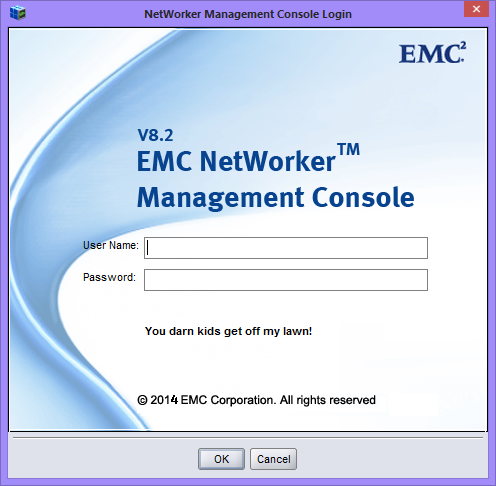
You darn kids get off my lawn!

Setting the greeting message is very straight forward. In NetWorker Management Console, go to Setup and from within Setup, choose the Setup|System Options… menu item:
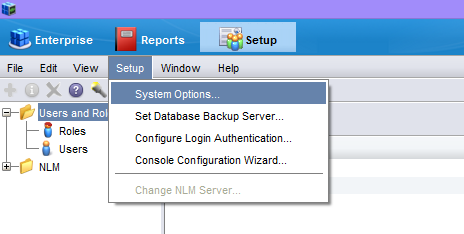
NMC System OptionsThe login banner message is set in the very first field:
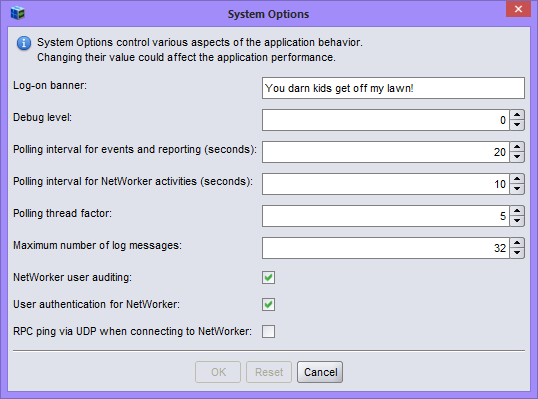
Entering the login message textWhile brief at 80 characters (no carriage return symbols can be input), the ability to set the login banner can help meet security requirements in some companies, so don’t forget it’s there.

Did you like this post? Please share it.

  • Share on Mastodon (Opens in new window) Mastodon
  • Email a link to a friend (Opens in new window) Email
  • Share on LinkedIn (Opens in new window) LinkedIn
  • Share on Tumblr (Opens in new window) Tumblr
  • Share on Pinterest (Opens in new window) Pinterest
  • Share on Bluesky (Opens in new window) Bluesky
  • Share on Reddit (Opens in new window) Reddit
  • Print (Opens in new window) Print
  • Share on WhatsApp (Opens in new window) WhatsApp

Like this:

Like Loading…

Related posts:

  1. What’s wrong with the NMC installation process?
  2. NetWorker 7.6 Enhanced Monitoring
  3. Recovery reporting comes to NetWorker
  4. Basics – Prior Recovery Details
Share: Linkedin
Tagged Login Banner, NetWorker Management Console, NMC
Author: Preston de Guise

Post navigation

Basics – Force incremental →
← Understanding Client Direct

I'm over at : Mastodon (backupbear@aus.social). I have abandoned X/Twitter and recommend you do too.

Search…

Latest Books!

The Small One!

My latest book is The Busy IT Manager’s Guide to Data Recovery. This book is short and to the point, designed for people who are either responsible, or accountable for data recovery. You can buy from here.

The Big One!

The second edition of Data Protection: Ensuring Data Availability is now available. It’s not just an update to existing content, there’s significant new information in this new edition. Buy here.

Archives

Copyright © 2026 Data Protection Hub

Design by ThemesDNA.com

%d